• Call: +1 (858) 429-9131

Cloud Call center – a real world use case

For last one decade we are seeing the convergence of numerous applications by migration to virtualized and scalable environments (cloud ). This began with hosting applications, portals, CRMs & massive success of salesforce.com etc. We had scenarios where smaller VoIP servers mostly with FOSS platforms like Asterisk were migrated. But such migrations lacked the complexity and automation levels needed for a full fledged, compliance ridden multi-location call center.


This is example of a use case where we have performed such a migration where a multi-location, automated call center operation is successfully implemented in the cloud.

E-commerce metrics that matter

In today’s fastidious world when Internet has taken over everything, it is hard to walk out of your homes and invest in a business. With the ease and availability of technological services, one is able to become an entrepreneur from their houses, starting a new business and conquering the world. Online sales through various websites and one’s own have become everyone’s cup of tea.

But, is your business leading you anywhere? It is always important to keep track of your progress so that you can meet the needs of your customers.

For amateur entrepreneurs, it could be difficult to track their achievements and progress. So, we have brought you a list of Key Performance Indicators (KPIs) to kick-start your business and establish it further.


AVERAGE ACQUISITION COST


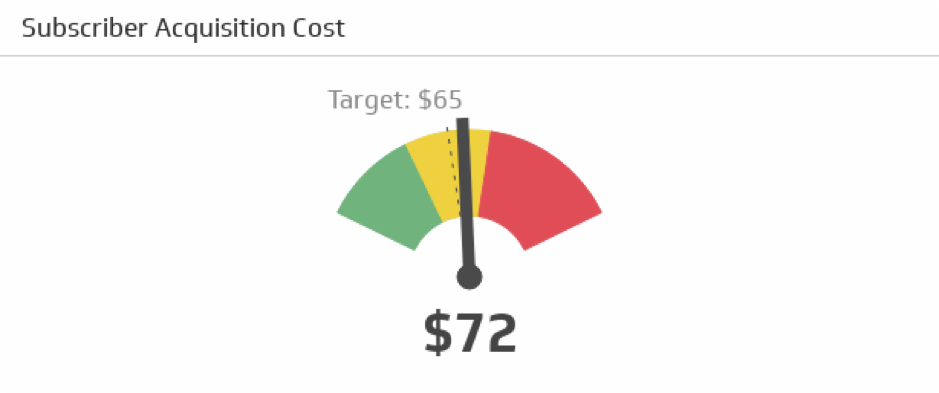
One of the most vital e-commerce metrics, AAC measures how much the cost could be to gain a new customer. For acquiring a profit, one must keep track of the acquisition channels. This ensures you pay for quality traffic and keeps your expenses under control.

Keep track and analyze all your forums- social media, websites, ads etc. and keep a note as to which particular forum makes a difference to your business and brings more revenue. It is very important to spend your budget in the right marketing forum to ensure a greater profit.


subscriber acquistion cost

CUSTOMER LIFETIME VALUE


CLV measures how much time your customer spends on your online website/shop in the complete customer lifecycle.


CLV= REVENUE EARNED FROM CUSTOMER – ACQUISITION COST


This could be a little complicated but it is important to keep customer behavioral psychology in mind, examine and analyze their behaviors.

You can also track your past offers that worked positively for the website, customers and also had boosted your revenue.


AVERAGE ORDER VALUE


CLV is yet related to another metric- the Average Cost Value (ACV).
ACV is an efficient way to increase customers/traffic on your websites.

This also ensures to note how many customers genuinely want your products and are ready to purchase them anytime. Ways to get more customers/traffic on your e-commerce website:


  • Value offers
  • Incentives
  • Discounts
  • Loyalty programs/offers
  • Bonus points


customer satisfaction

CONVERSION RATE


The most vital e-commerce metric, Conversion Rate keeps the track on how many of your followers/website visitors actually convert into customers.

This, in turn, helps track the shopping experience you provide to your customers. Hence, conversion rate could help you to increase customer experience, provide offers/discounts/bonuses if necessary for the smooth running of your forum.


AVERAGE MARGIN


Average Margin is what your website is earning from each profit that you have enquired. In other words, it tracks what percentage of the retail price has been your profit.

It is advisable that you always keep the margin higher than the average acquisition cost. This ensures you have a healthy striving business and happy customers!

cutomer service


CART ABANDONMENT RATE


Statistics show that about 60-70% people abandon their carts online.


Some of the most common reasons are:

  • High shipping costs
  • Requirement for registration
  • Free shipping not available
  • Estimated delivery not quick enough
  • Unavailability of many payment options
  • Complicated checkout process


Some customers also abandon their carts because they are only there for the visual experience or “window shopping” and do not intend to shop.

cart abandoment

REFUND AND RETURN RATE

In e-commerce business, especially in the online clothing business, refund and return are the primary functions; which if unavailable could cost you valuable customers and lower your profits.

It is important to keep track of the most returned products and advisable you remove them from your forum. It is important to keep the customer feedback in mind and work on meeting their demands and solving their problems. This ensures healthy business and rapport between the customer and the e-commerce website.

Frequent refunds/returns can, in turn, cost your image on the market forum and bring down your valuable profit and revenue.


How to avoid frequent refunds/returns?


  • Photos uploaded should be under natural light conditions and from every possible angle.
  • A Correct description of the product must be mentioned along with correct sizes.
  • In the clothing industry, the material of the product engages maximum importance. Hence one should be careful while describing. Always mention the type and quality of clothing.
  • One must also make sure that the quality of the product adheres to the price of the product mentioned.

return and refund

SUPPORT RATE


It is easy to maintain a high support rate on an offline business but online, it gets a little too tricky. Support rate measures how many of your customers need the company’s support before purchasing products. If this is too high, then you must look into the product statistics and improve on the product or look into the complaints or frequently asked questions (FAQs)

For efficient growth of your e-commerce website make sure you keep all your communication portals open and free. Live chats, E-mail services, Toll-free numbers are some ways one can create communicative efficiency.


It is always better to attend and resolve customer problems and look into customer grievances. This ensures a good customer base and your reputation.


Some suggestions for a healthy customer relationship:


  • Always address the customer. No matter how frustrated they seem, it always calms them down.
  • Listen before you speak.
  • Address the problem to the point.
  • Always be polite.
  • Try and solve the problem then and there.
  • It’s okay to ask for customer feedback.

customer relationship


BEST PERFORMING PRODUCTS AND CATEGORIES


Some products on your e-commerce website may sell better compared to others. But there could be many other products that have the potential to be sold just as much but do not make it because of faulty or lack of correct advertisements.

This could lead you to lose important revenue.


Learn to sort out items. You could do that based on:

  • Outdated items which are no longer viewed/encouraged by customers
  • Items often bought together
  • Group possible items that can be bought together
  • Items that engage more sales


It is important to keep your bestsellers selling but it is also essential to make sure all your other products get the necessary exposure to your customer’s interest.


best sellers

In today’s world when technology is overpowering the minds of business personnel, these e-commerce metrics are mentioned to make your lives easier and keep your business thriving. We understand the pain you take to settle your business and hence we lay our objectives towards giving you some ways and tips to ensure your business is running smooth and you enquire maximum profit.

Tweaking APCu size for Phabricator

APCu is the substitute for the old APC extension. In APC extension it supports both opcode caching and data caching whereas APCu extension supports only data caching. Opcode caching is transparent at a source code level where as data caching is not.The main thing to note is that we need to allocate memory for APCu to use.

Configuration On Ubuntu System

First, we need to install the php7.1 module APCu.  We do with Usual ubuntu command Like this.

apt-get install php7.1-apcu


After the successful installation of the module, we need to modify the configuration file which is in most case at location

“/etc/php/7.1/mods-available/apcu.ini”

Then we need to Make changes in this file to enabling and tweaking the size of APCu. Here are the changes we made in the config file.

extension=apcu.so

apc.enabled=1

apc.shm_size=64M

apc.ttl=7200

apc.gc_ttl=3600

apc.enable_cli=0


apc.shm_size

This will allocate 64MB from the RAM to APCu for its caching purposes.

apc.enabled

apc.enable enables it for PHP-fpm and  apc.enabled can be set to 0 to disable APCu.

apc.enable_cli

Activates it for command line-PHP like cronjobs.

apc.ttl

The number of seconds a cache entry is allowed to idle in a slot in case this cache entry slot is needed by another entry.

apc.gc_ttl

The number of seconds that a cache entry may remain on the garbage-collection list.Set to zero to disable this feature.


If you need the different type of configuration like apc.user_ttl, apc.filters etc.. you can also add with above settings.

After the completion of the configuration, save the file and make the symlink.

“sudo ln -s /etc/php/7.0/mods-available/apcu.ini /etc/php/7.0/fpm/conf.d/30-apcu.ini”

Restart php7.1-fpm service

To check the APCu size use this command

“php -i | grep apc.shm_size”

It will results like this

“apc.shm_size => 64M => 64M”


Applying blockchain innovations to Highly transnational Network dependent services

This is a discussion of recent innovative developments in the blockchain related technologies which needs to be understood. I am no expert in cryptography or economics and this not on crypto-currency or economics but mostly on the blockchain, transactions & storage as well as various opportunities and applications.

Transactions


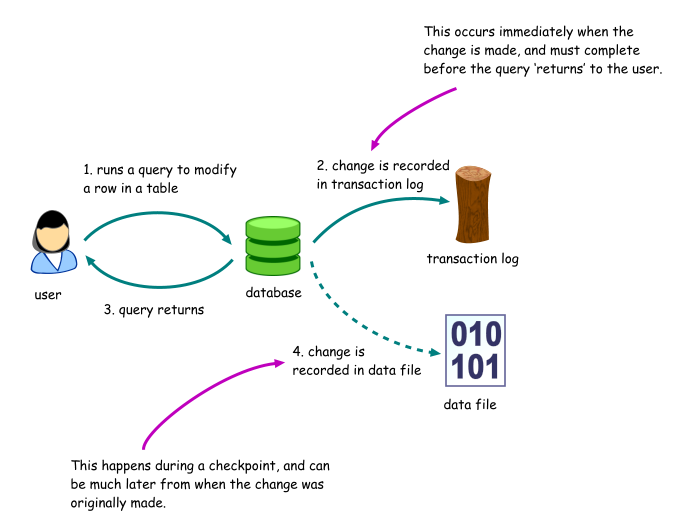
(a typical database transaction from : http://www.writeopinions.com/database-transaction)

One the issues around blockchain is the slow transaction times. Blockchains used by bitcoin suffers very slow speeds and this is impacting the entire ecosystem surrounding it. The newer blockchain, Etherium is also facing similar trait and this is much more evident with the recent curiosity around crypto-kitties. [reference 1]


STEEM & bitshares blockchains as well as the new EOS blockchains addresses this problem with Graphene.


Graphene

This technology could be a solution for various distributed – highly transactional applications & can act as the engine of public-ledger implementations.

Graphene is an open-source blockchain implementation which theoretically supports 100K transactions per second. This is been proved with STEEM blockchain where the steemit.com social media platform is already performing very large number of transactions similar to the like, post, comment operations on social media applications like facebook.com. The behind Graphene is well established and the CTO for all the 3 block chains which uses Graphene is Dan Larimer who is blockchain expert.

Exploring graphene to replace traditional databases at the transaction layers could be a possibility that can be explored.


Storage

Another major aspect of distributed applications is storage. This not just a capacity planning and CAPEX problem, but as the technology needs to address the highly mobile user base. Further complications are added by the low internet speeds of developing countries where mobile based payments (eg: mPesa in Kenya, IMPS based systems in India) & related applications are becoming mainstream. These markets are important not only because of the large volumes but also the speed at which innovative trends are adopted but the governments are pushing digital payments, e-governance etc.


The storage layer has two issues at a very high level

  • storage
  • retrieval

We will skip the storage for the time being and directly jump to retrial as I believe tats where the new blockchain based technologies has an advantage above other systems.

Traditionally the retrieval can be slow due to multiple reasons like disk failures, slow network speed, congestion in the network, denial of service attacks etc. The block chain evolution has contributed in the development of new file systems which can address many of the issues associated with accessing content over a network.

Inter Planetary File System (IPFS)

This is another innovative development which has its roots in the blockchain — especially the bitcoin blockchain technology. The file system provides uniquely addressable HTTP / Web URL like unique identifiers for files. This means, we get a truly distributed, de-duplicated file system which is accessible like a traditional URL. This also means, web servers for content delivery & CDNs can be atleast in theory replaced as well !


Possible applications of these new innovations

Graphene — can be seen as a high speed, fault tolerant, in-memory transnational data store. Though more study is required, this sounds like meeting the ACID requirements for databases & offers faster transaction times.

This faster transaction times can be used in Telecom HLRs, Financial processors & even facebook like systems where Likes/comments etc happens at a very fast pace. As a proof of concept the social media portal Steemit.com uses Graphene as the underlying datastore.

IPFS — IPFS can be used as the data store where all the metadata and the content itself gets stored. This can be considered as disc storage and object/data store in the database. Thogh it doubles as a disk and database the access speeds are very high and the distributed nature makes denial services difficult. So is censorship. Surprisinly this was recently used during the Catalan independence referendum, 2017 to provide free access to content.

In a nutshell, these technologies can be applied to solve many of the issues around transacton speeds, storage etc in addition to crypto-currency. Finding innovative use cases with maximum impact can provide opportunities for both service providers as well as for enterprises.

Existing use cases and deployments

There are multiple existing non-crypto-currency deployments out there which can be considered to be out of beta.

  1. Steemit.com — a unique blend of crypto-currency and social media platform
  2. The Catalan Independence Referendum, 2017 use case
  3. Everipedia.org is planning to migrate their platform to IPFS and Graphene
  4. Fllowmyvote — uses Graphene for storing the transactions
  5. FileCoin – uses IPFS for its distributed, redundant storage mechanism

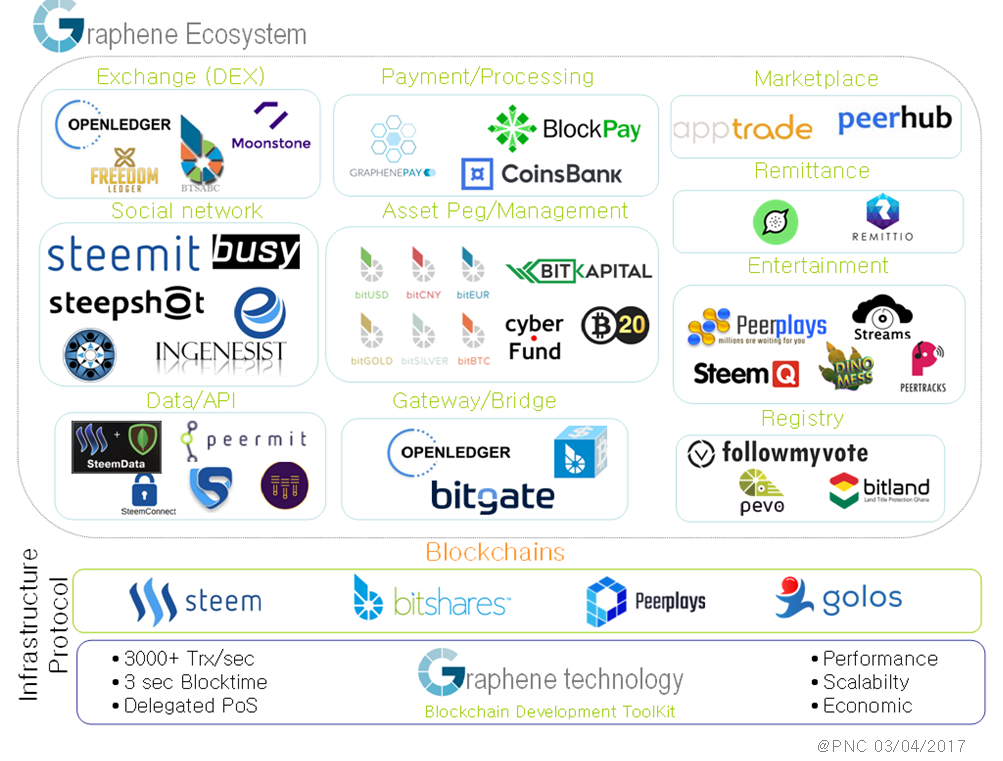
A much larger set of existing use cases including the crypto-currency scene is pictured below.

Conclusion

In a nutshell, these technologies can be applied to solve many of the issues around transaction speeds, storage etc in addition to crypto-currency. Finding innovative use cases with maximum impact can provide opportunities for both service providers as well as for enterprises.


References:

  1. Crypto-kitties & Etheritum blockchain congestion
  2. Graphene documentation : http://docs.bitshares.eu//index.html
  3. https://followmyvote.com/understanding-the-graphene-blockchain-ecosystem/
  4. Start your own block chain ! : https://objectcomputing.com/resources/publications/sett/march-2017-graphene-an-open-source-blockchain/


Migrate2Cloud provides innovative solutions which are scalable and reliable in the healthcare, banking, manufacturing and retail sectors. To know more, feel free to reach out to innovation@migrate2cloud.com

Upgrading Rocket Chat

This is a very quick post. Many organizations are using Rocket chat as the slack / IRC alternative.

One important point that is not often documented is the upgrade. We ourselves ran into issues with Node.js errors, Meteror errors etc multiple times.

Here is how we can upgrade without breaking anything.

take a backup of the installation directory

cd /home/rocket
su -l rocket
cp -rfp Rocket.chat backups/date +%F

Assuming that backups are kept in /home/rocket/backups and db backups are in /home/rocket/backups/db

cd backups/db
mongodbump
rm -rf /home/rocket/Rocket.chat

#get the new version

cd /home/rocket
curl -L https://rocket.chat/releases/latest/download -o rocket.chat.tgz
tar xf rocket.chat.tgz
mv bundle Rocket.chat

install dependencies

(cd /home/rocket/Rocket.chat/programs/server && npm install )

All set to start the new server, migrate the dabase etc.

cd /home/rocket/Rocket.chat
node main .js

The last step performs upgrade and maintenance of the db scheme. With most of the versions this method will work.

It is assumed that the user rocket is the user under which Rocket.chat is installed.

Further, the server is running as a service which was done with :

sudo forever-service install -s main.js -e "ROOT_URL=https://chat.agileblaze.net/ MONGO_URL=mongodb://localhost:27017/rocketchat PORT=3000" rocketchat

DevOps stories 1: working with a high traffic e-commerce portal

Looks like this is a good idea to write down first person stories of various DevOps – Cloud migration scenarios that we come across.

In this particular case we have a beast of a server with 32 processors with 8 cores each & 256 of RAM running LAMP stack, CakePHP &  X-cart shopping cart. And yes, everything is dead slow.

Cleaning up the X-cart cache

By default (?), the cache is at /var/www/html/cache or [DOCTUMENT_ROOT]/cache. If there are too many files, you will not be able to delete the files. The following commands can help.


touch /root/agileblaze/cache-file-list.txt #empty file
find . -name '.js' | grep -vFf /root/agileblaze/cache-file-list.txt | xargs /bin/rm -f
find . -name 'sql.
' | grep -vFf /root/agileblaze/cache-file-list.txt | xargs /bin/rm -f
find . -name 'rf*.php' | grep -vFf /root/agileblaze/cache-file-list.txt | xargs /bin/rm -f

The permanant fix for this X-cart behaviour is to change the following row in the config.php file from:

define('USE_SQL_DATA_CACHE', true);
to
define('USE_SQL_DATA_CACHE', false);

MySQL

There are tons of issues like a db that is not upgraded, joins without indexes etc. We decided to make use of the RAM & have MySQL MYISAM temporary files in there for faster access. Don’t forget to create the required directory and add the necessary entries /etc/fstab to persist the changes over reboots.

/etc/my.cnf is changed as follows

tmpdir = /var/mysqltmp # changed from /var/lib/mysql/tmp

Now that we have some room to look into other matters, things should be easier.

We also had the non-so-friendly max connections error. We increased in the max connections from the default.

# MAX CONNECTIONS
max_connections = 300 #Sat Apr 30 03:35:25 CDT 2016

Slow Queries

If the slow query log is enabled, mysqldumpslow can be a very handy command

[root@714219-db1 mysql]# mysqldumpslow -a -s r -t 10 /var/log/mysql/slow.log

Reading mysql slow query log from /var/log/mysql/slow.log Count: 376687 Time=1.63s (613441s) Lock=0.00s (36s) Rows=203657.1 (76714970948), 2users@localhost SELECT productid, COUNT(remote_ip) AS total, AVG(vote_value) AS rating FROM xcart_product_votes GROUP BY productid

Controlling the RAM usage


The RAM usage on GNU/Linux based systems can be sometimes quite weird. The immediate path taken is to play around with sysctl and tweak swappiness & may be run drop_cache.

ie,

change swappiness to say, 10 & do a cache + buffer cleanup. But these may not be very handy but the /proc/sys/vm/vfs_cache_pressure changes seems to help further. (we have it around 512)

Further minimum free memory size is a parameter which can help preventing OOM errors. A sample value is shown below.

sysctl -w vm.min_free_kbytes=2621440

Further:

sysctl -w vm.vfs_cache_pressure=1024
sysctl -w vm.swappiness=10


Keep an eye on Caches and Buffers

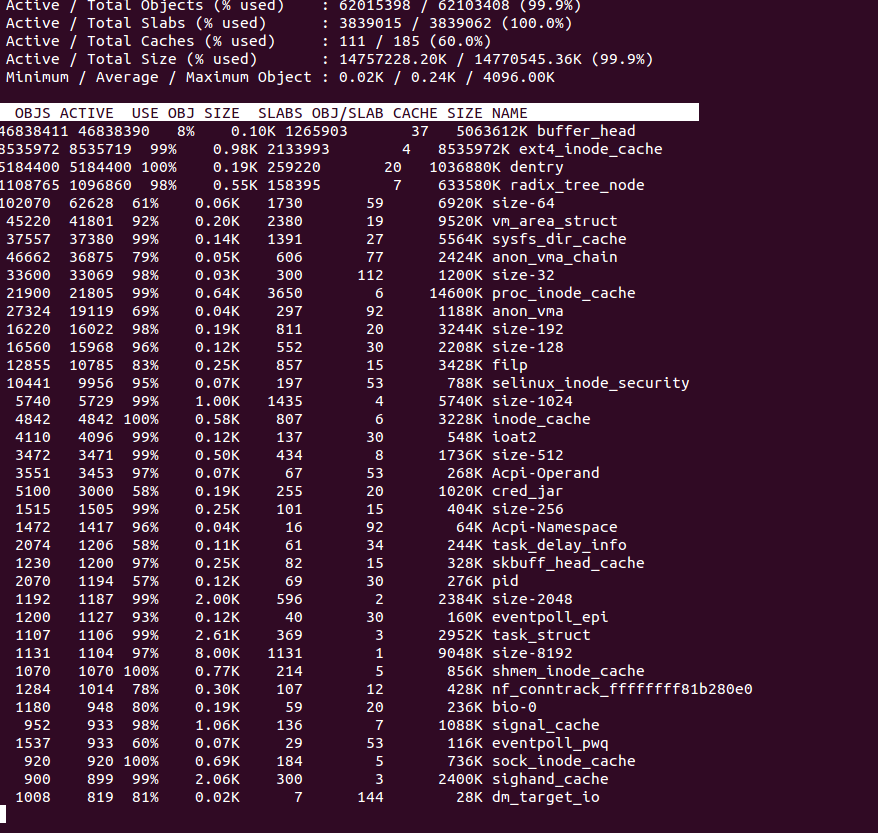
This is often something people miss.   The difference between free command and the total process usage can give us the Cache + buffer usage.  slabtop is a very handy command to get exact details.

slabtop --delay=10 -s c

Can give a neat summary.

Screenshot from 2016-05-11 20-28-07


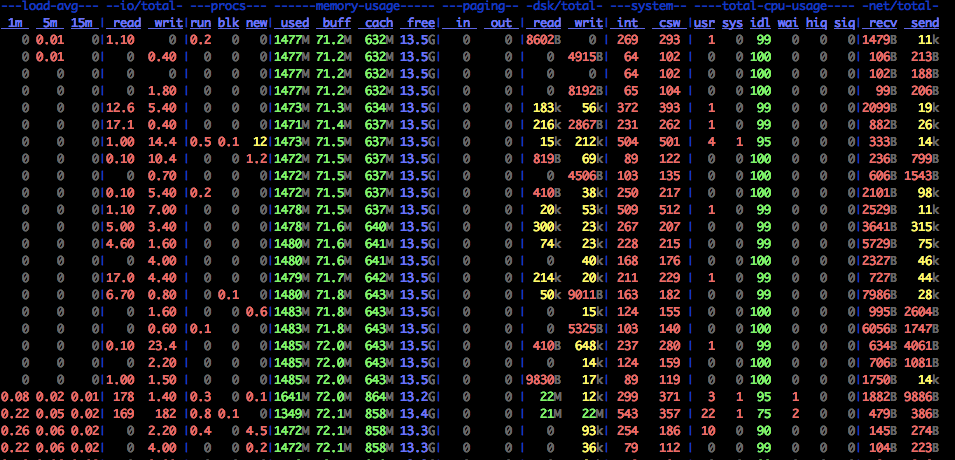
Another very useful tool is dstat

dstat -lrvn 10 output is shown below. This can give colourful details of cache usage.

the memory, CPU, network, IO columns above gives useful information.


How to read dstat : On a fully warmed-up system, memory should be around 95% in-use, with most of it in the cache column. CPUs should be in use with no more than 1-2% of iowait and 2-15% system time.


How to setup automatic updates:

Sometimes it is quite good to have automatic updates in place. For Ubuntu, automatic updates can be done following these instructions.


Urban Airship Push Notification Integration

Push Notification is one of best way to interact with app users. Every mobile developer knows the importance of push notification in mobile apps. Push Notification provides near real-time updation of informations such as news,score updates,messages etc., to users. iOS provides APNS (Apple Push Notification Service) to send push notification data to applications installed on Apple devices. There are many third party push notification services are available  like Parse,Urban airship, Carnival,Push woof etc. The benefits of using third party Push Notification service are,

  • – Reduce Your code.
  • – Save Your  time and effort.
  • – Manage the notifications easily.

This section will explain some simple steps to be followed to send push notification to iOS platform via Urban airship dashboard. The steps are given below.

  • 1. Registration and login
  • 2. Create Your first app in Urban airship
  • 3. Set up your xcode project.
  • 4. Send your first Push Notification

Registration and login

You need to create an account in Urban Airship using an email id and password. There are many pricing plans available. Select a pricing plan or select a free starter account. Click here to view the available account plans. After the successful registration, click manage your apps from Urban Airship dashboard to get started.

Create Your first app in Urban Airship

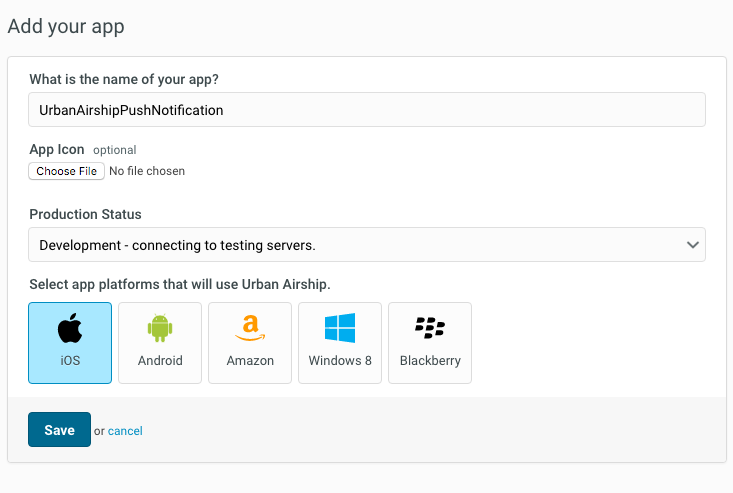
After the registration is completed, add your first app. You need to specify the following details to create an app.

App Name

The name of your app.

App Icon

Upload an app icon.

Production status

You must select whether your app is in development mode or production mode. When you are setting up development and production apps, you have to configure them for push services. See the APNS Setup documentation for detailed instructions.

Select Platform that will use Urban Airship

Select your platform here. The available platforms are iOS, Android, Windows, Blackberry etc.

After selecting the iOS app platform, save your app.
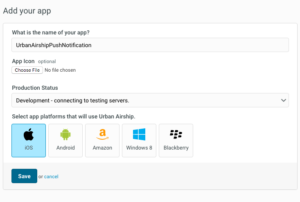
app fields

Set up your xcode project

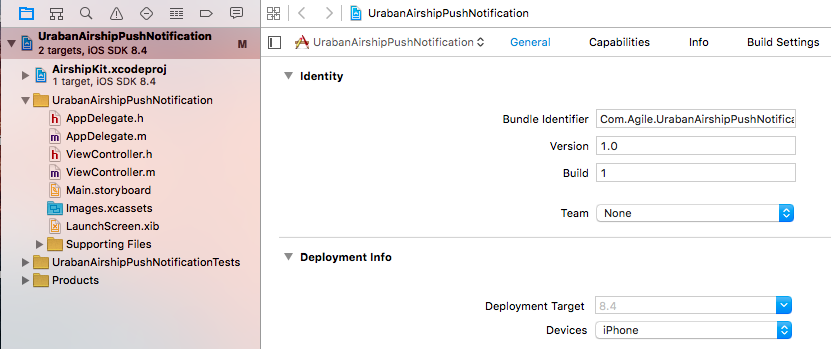
You have created an app in previous section. Then you need to set up the xcode project. First, create an xcode project for push notification. Then you have to follow some steps to set up your project. The steps are  explained below.

  • Download Urban airship SDK

Download the latest version of  libUAirship from Urban Airship. Unzip the SDK and add the libUAirship static library and headers into your project. Click here to download the latest version of Urban Airship SDK.
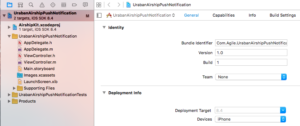
airshipKit

  • Manage Build Settings

In the project’s build settings set “Enable Modules” field to “Yes” and “Link Frameworks Automatically ” to “Yes”.

  • Add Urban Airship SDK

The SDK can be included using the Urban Airship static library(iOS 7+) and Urban Airship Embedded framework(iOS 8+). The static library and embedded framework have different setup procedures.

      Including Urban Airship SDK using Embedded framework(iOS 8+)

-Include Airshipkit

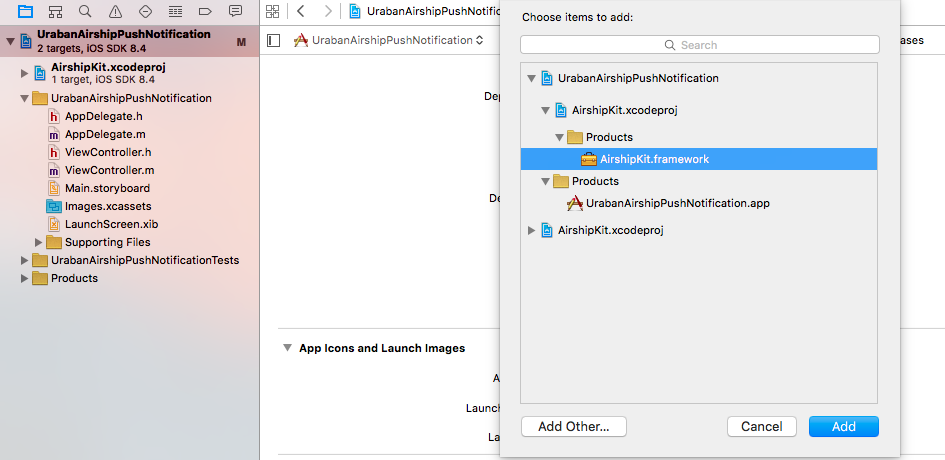
Add  Airshipkit.XcodeProj into your app project in xcode.

-Link against embedded framework
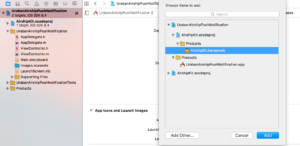
adding framework

Add the Airshipkit.framework file to the Embedded binaries section in the general tab for your project to link against the embedded framework.

Including static library (iOS 7+)

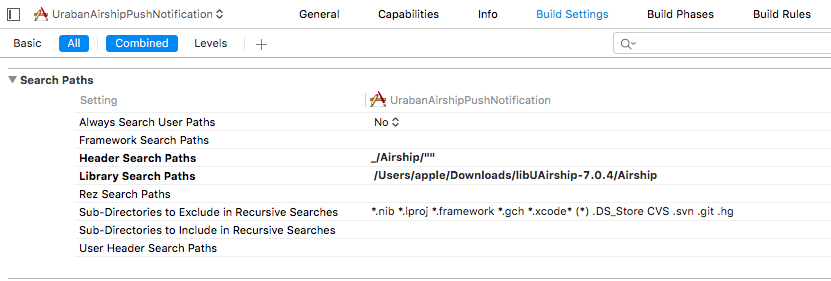
– Search paths
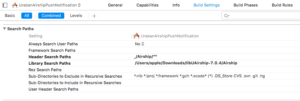
Screen Shot 2016-04-20 at 1.00.23 PM

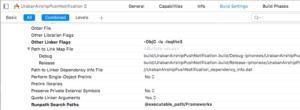
Ensure that your project’s header search paths under build settings include the Airship directory.

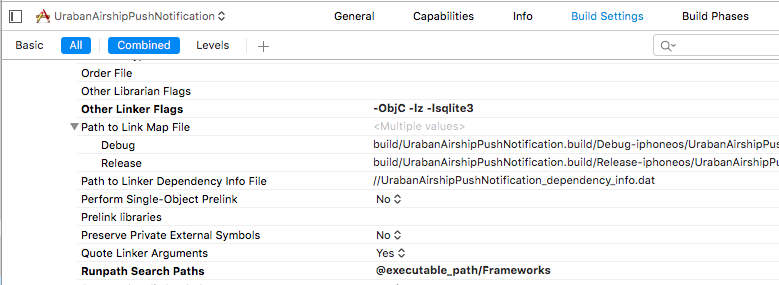
– Linker Flags

Add –objC –lz –lsqlite3 linker flag to prevent “Selector Not Recognized” runtime exceptions and to include linkage to libz and libsqlite3. The linker flag –force_load<path to library>/ libUAirship<version.a> may be used in instances where using the –objC linker flag is undesirable.
Screen Shot 2016-04-20 at 1.01.21 PM

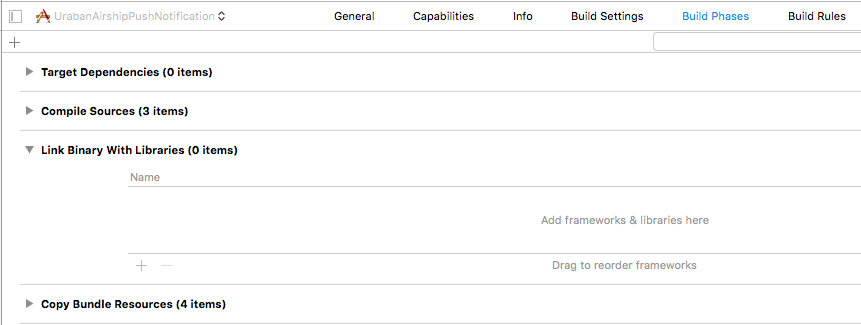
– Link against the static library

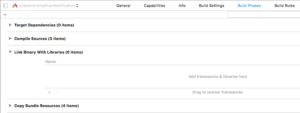
In the libraries section in the Build Phases, add the libUAirship.a file to the link binary to link against the static library.
link binary

– Add the Urban Airship resource bundle

Add the UrbanAirshipResources.Bundle file to the Copy Bundle Resources section in the Build Phases tab for your target.

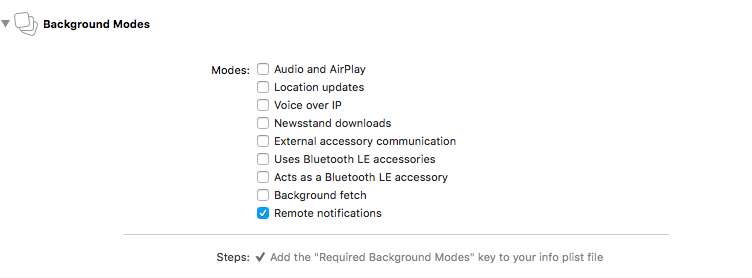
  • Enable Background Notification

You can enable Background notification by enabling Remote notifications of Background mode under the target’s capabilities section.

remoteNotification

  • Create AirshipConfig.plist

To manage your production and development application profiles, the Urban Airship SDK uses a .plist configuration file named AirshipConfig.plist. You can create two application within your Urban Airship account:one for development and one for production. Create  an AirshipConfig.plist and set the following values in your .plist file.

<?xml version="1.0" encoding="UTF-8"?>
<!DOCTYPE plist PUBLIC "-//Apple//DTD PLIST 1.0//EN" 
"http://www.apple.com/DTDs/PropertyList-1.0.dtd">
<plist version="1.0">
<dict>
  <key>detectProvisioningMode</key>
  <true/>
  <key>developmentAppKey</key>
  <string>Your Development App Key</string>
  <key>developmentAppSecret</key>
  <string>Your Development App Secret</string>
  <key>productionAppKey</key>
  <string>Your Production App Key</string>
  <key>productionAppSecret</key>
  <string>Your Production App Secret</string>
</dict>
</plist>
  • Import the required header files

Import the AirshipKit header files to your application delegate.

Import AirshipKit (Swift)

#import<AirshipKit/ AirshipKit.h>

You must import the individual headers if your application uses the static library.

#import “UAirship.h”

#import “Uaconfig.h”

#import “UAPush.h”
  • Starting Urban Airship Services

Inside your application delegate’s application:didFinishLaunchingWithOptions:method,initialize a shared Uairship instance by calling Uairship takeoff.This will bootstrap the Airship SDK.

-(BOOL)application:(UIApplication*) 
didFinishLaunchingWithOptions:(NSDictionary*)launchOptions
{

         [Uairship takeOff:config];
}
  • Retrieving your channel ID

The channel ID is a unique identifier used to target pushes to a specific devices using the Urban Airship API.You can always get the channel ID using the following code.

ObjC:

            NSString *Channelid=[Uairship push].channelID;
            NSLog(@”My channelID:%@”, Channelid);

Swift:

            Let Channelid=Uairship.push().ChannelId
            print(”My channelID:%@”, Channelid)

ChannelID initially comes back as NULL on your apps first run.It will be created and persisted during registration.

  • Enabling User Notifications

By default User notifications are disabled.To enable notification write the following code. Set the user notification types on [Uairship push]. Sounds, alerts and badges are the default types. The library will register to receive notification after the user push notifications are enabled.

[UAirship push].userNotifictionTypes=(UIUserNotificationtypeAlert| UIUserNotificationtypeBadge|UIUserNotificationtypeSound)

[Uairship push].userpushNotificationEnabled=YES;

After all this steps your project’s AppDelegate.m file looks like  below

AppDelegate.m

#import <AirshipKit/AirshipKit.h>

#import “AppDelegate.h”

@interface AppDelegate ()

@end

@implementation AppDelegate

-(BOOL)application:(UIApplication*) 

didFinishLaunchingWithOptions:(NSDictionary*)launchOptions

{
         [Uairship takeOff:config];

         //Set the icon badge to zero

         [[Uairship push]resetBadge];

         [UAirship push].userNotifictionTypes=(UIUserNotificationtypeAlert|   

         UIUserNotificationtypeBadge|UIUserNotificationtypeSound)

         [Uairship push].userpushNotificationEnabled=YES;

}

Send your first push Notification

  • Adding Test Devices

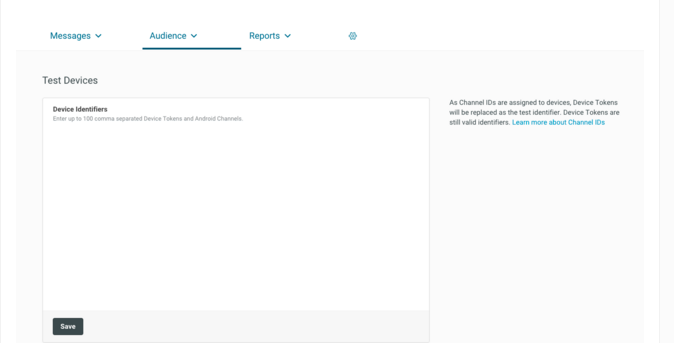
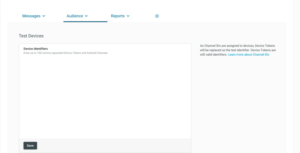
You need to add a list of test devices in Urban airship console before sending your first notification. To setting up test devices, select Audience. You can see a text box for entering  list of device identifiers. You can enter up to 100 device identifier here. After entering the device identifiers save the list.
add audience

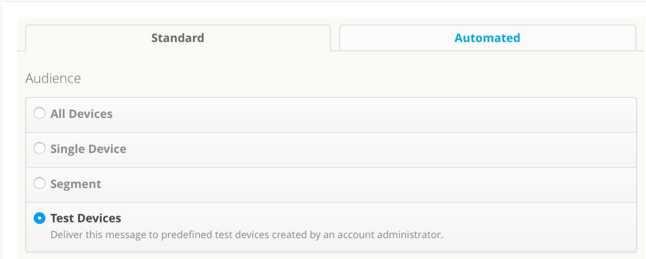
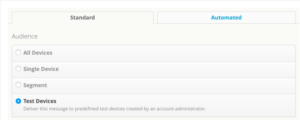
To send your first push notification,navigate to Messages Overview ,located under the Messages tab,and click + Messages. You can see a Message box here and type your notification message here. Before sending the notification you have to select the audience and delivery options. The audience are,

All Devices

Single Device

Segments

segments are groups of audience that you can create using combinations of location,tags and lists.

Test Devices

Test devices are predefined devices created by an account administrator.
selecting audience

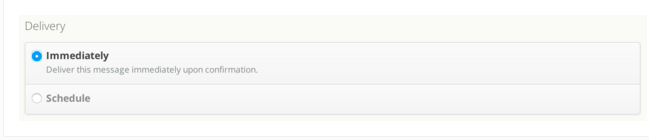
Select an audience from the list. Then navigate to the delivery section and you can see two options here.

Immediately

Deliver the message immediately.

Schedule

Deliver the messages according to the scheduled time

delivery

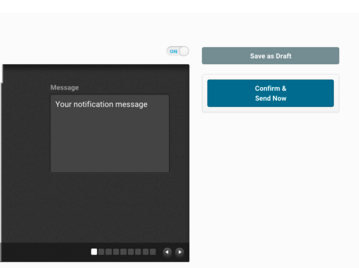
If all has been set up correctly,click Confirm and Send Now.
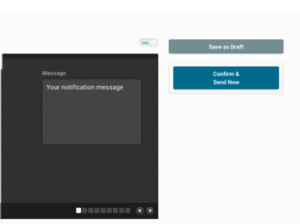
send 1st

You  have sent your first push notification!!!